Sarvam AI

Complete more digital account openings with Sarvam Voice Agents

When a savings account application stops halfway, Sarvam Voice Agents call the applicant, explain the step they left, and book their video KYC on the same call.

From an unfinished form to a booked video KYC

Five steps the agent follows on every unfinished application.

Step 1 of 5

Pick up the unfinished application

A webhook from your account opening system gives the agent the applicant, the screen they left and the details they had already entered. The agent calls during the hours you set.

Unfinished application SB-7740
Variant Regular savings
Stopped at Nominee details
Left the form Today, 6:12 PM

Savings account applications, completed on a phone call

The agent calls each applicant who stopped halfway. It explains the step they left and books the video KYC that comes next.

Calls on every unfinished application

Your account opening system sends a webhook when an applicant leaves the form, with the screen they stopped on and the details already filled in. The agent calls during the hours you set.

Unfinished application SB-7740

Stopped at Nominee details
Already filled PAN, Aadhaar, address
Left the form Today, 6:12 PM
Voice Agent

"Your savings account application is almost done."
Explains the step they left

Answers questions about the screen the applicant stopped on, such as nominee details, the account variant or the initial deposit, using your approved answers.

Nominee details Explained

Name
Relationship
Date of birth
Voice Agent

"You only need their name, relationship and date of birth."

Books video KYC

Offers open slots from your video KYC calendar, books the one the applicant picks, and sends the time, the link and the documents to keep ready by SMS.

Video KYC Booked

When Sat 7th Nov, 10:30 AM
Keep ready Original PAN card
Link Sent by SMS
Voice Agent

"I have booked Saturday at 10:30 AM for you."

Hands bigger requests to your team

The agent helps the applicant finish the form. Your bank verifies the applicant and opens the account. An applicant who wants to visit a branch, or asks about an earlier rejection, goes to your team on a live transfer.

Transfer Branch team

Reason Wants to open at a branch
Branch Malviya Nagar, Jaipur
Application SB-7740, attached
Voice Agent

"Let me connect you to our branch team."

Built for how applicants
describe the form

Applicants describe a screen by what they saw on it. The agent knows which step they mean.

  • "The page that asked for money"

    Applicants rarely know the name of the screen they left. The agent matches what they describe to the step on the application, then explains it.

  • Times said the way people say them

    Callers say a time like "Saturday, साढ़े दस बजे". The agent books the 10:30 AM slot and reads it back before it confirms.

  • Hindi for the call, English for the banking words

    Applicants say nominee, KYC and PAN in English inside a Hindi sentence. The agent works across Indian languages and follows the caller when they switch.

Set up your account opening agent

Describe your account opening follow-up call to Genie and it builds the agent for you.

Build your agent

Shape the conversation

  • Built with Genie

    Tell Genie which applications the agent should follow up and what it should help with. It writes the agent and its goals. Keep talking to Genie to match your process.

  • Connect your knowledge and systems

    Add your account variants, document lists and onboarding FAQs as a knowledge base. Connect your onboarding webhook, video KYC calendar and CRM as tools.

Connect and launch

Give every call a next step

  • Test every scenario

    Test the hard cases before launch, like a nominee question, an applicant who wants a branch or a slot that needs moving.

  • Connects to a phone number

    Rent a phone number from Sarvam or connect your existing telephony provider. KYC is required for rentals.

  • Take it live

    Once the webhook is switched on, the agent calls every applicant who leaves the form. Track video KYC bookings on your dashboard.

Measure results

See where conversations lead

  • Track every outcome

    Track applicants called, applicants reached, questions answered, video KYC slots booked and calls transferred.

  • Where applicants stop

    See which screens cause the most drop-offs, which questions come up, and why calls were transferred.

  • By variant and language

    Break calls down by account variant, the screen left and the call language.

What to measure

Each one is on the template's results view from the first call. Read them in the order a call runs.

  1. Connected calls

    Every call that reached the customer.

  2. Applicants reached

    Share of unfinished applications where the agent spoke to the applicant, by the screen they stopped on.

  3. Applications resumed

    Applicants who went back to the form after the call, matched against your account opening system.

  4. Video KYC booked

    Video KYC slots booked on the call, and how many applicants then joined at the booked time.

Reasons for stopping, taken from each transcript

  • Nominee details
  • Initial deposit
  • Document upload
  • Wanted a branch visit
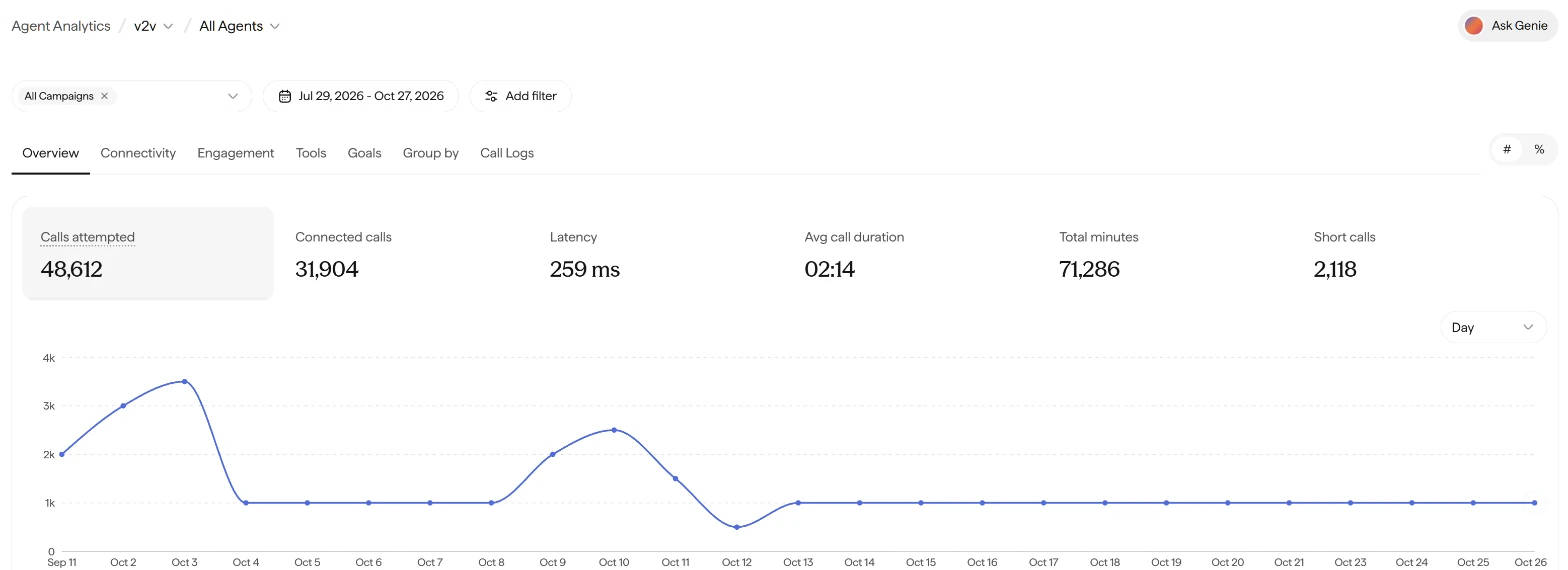
Voice Agents analytics, Overview tab: calls attempted, connected calls, latency, average call duration, total minutes and short calls, with calls per day as a line chart
See all banking templates

Customer data stays in India

Every model on the call runs on Sarvam's own infrastructure, with no outside AI provider involved.

Visit the Trust Center
  • ISO 27001 certified
    Information security ISO 27001:2022 Certified
  • AICPA SOC 2
    Controls attestation SOC 2 Type II Audited
  • Where call data stays India Including customers' personal details
  • Models on the call Sarvam infrastructure No outside AI provider

Questions about account opening completion agents

Updated

Can a voice agent recover incomplete digital account opening applications?

Yes. Your account opening system sends each unfinished application to the agent through a webhook. The agent calls the applicant, explains the step they left, and books their video KYC from your calendar.

Which account opening questions can the agent answer?

It answers from the knowledge base you add, such as account variants, documents, the initial deposit and nominee details, in the words you approve. Applicants can also call your number halfway through the form and get the same answers.

How does the agent book video KYC?

The agent offers open slots from your video KYC calendar, books the one the applicant picks, and sends the time, the link and the documents to keep ready by SMS. Your KYC official runs the video call.

Does the agent open the account?

No. The agent helps the applicant finish the form and books video KYC. Your bank verifies the applicant and opens the account. Applicants who want a branch visit, or ask about an earlier rejection, go to your team on a live transfer.

Can applicants speak in their own language during digital account opening calls?

Yes. The agent works across Indian languages, including Hindi, Marathi, Tamil, Telugu, Bengali and English. When language switching is on, it follows the caller if they change language mid-call.

Where is applicant data processed?

All call data, including applicants’ personal details, stays in India. Every model on the call runs on Sarvam’s own infrastructure, with no outside AI provider involved. That infrastructure is ISO 27001:2022 certified and SOC 2 Type II attested.

Build the Future of India's AI with Sarvam