Sarvam AI

Answer every claim intimation call with Sarvam Voice Agents

Sarvam Voice Agents answer the first call after a loss, check the policy, record what happened in the order your claim form needs, and register the claim with a reference before the caller hangs up.

From the first call to a registered claim

Five steps the agent follows on every claim intimation call.

Step 1 of 5

Answer and check on the caller

The agent picks up your claims number at any hour and asks whether the caller is safe before anything else. If someone is hurt, it transfers to your claims desk straight away.

Safety check First question
Caller safe Yes
Injuries None

First notice of loss, recorded in full

The agent checks the policy, takes the details your claims team needs, and registers the claim while the caller is still on the line.

Confirms the policy is in force

Finds the policy from the policy number, vehicle registration or registered mobile number, and checks it was active on the date of the incident.

Policy check 3 of 3

Policy found
Registered mobile
Active on incident date
Voice Agent

"Your policy was active on the day of the incident."
Records the loss in your claim form's order

Asks when and where it happened, what was damaged, whether anyone was hurt, and who else was involved. For health, it takes the hospital, the admission date and the condition.

Incident Captured

When Today, 9 AM
Where GK-1, Delhi
Damage Rear bumper
Voice Agent

"Was anyone injured?"

Registers the claim and sends the reference

Reads the summary back for the caller to confirm. A webhook then creates the claim in your claims system, and the agent reads out the reference and sends it by SMS with the next steps.

SMS Now

Your claim MT-8841 is registered. Our team will contact you about the survey. Keep your RC and driving licence ready.

Voice Agent

"Please note your reference, MT-8841."

Escalates what cannot wait

Injuries, theft, third-party damage and large losses go to your claims desk on a warm transfer, with the details already on the claim.

Transfer Claims desk

Reason Driver injured
Claim MT-8842, details saved
Handed to Claims desk, live call
Voice Agent

"I am connecting you to our claims team now."

Built for how people
report a loss

Callers are often shaken after an accident or a hospital admission. They jump around, describe places by landmark and switch languages. The agent follows them and still records every detail the claim needs.

  • The story comes out of order

    Callers often start with the damage, then the time, then the other driver. The agent fills each field as it hears it and asks only for what is missing.

  • Places by landmark

    People describe where it happened by a market, a flyover or a petrol pump. The agent records the description and the locality your claim form asks for.

  • Hindi for the call, English for the details

    Callers switch to English for vehicle numbers, car parts and hospital names. The agent works across Indian languages and follows the caller when they switch.

Set up your claim intimation agent

Describe your claim intimation call to Genie and it builds the agent for you.

Build your agent

Shape the conversation

  • Built with Genie

    Tell Genie you want an agent that takes claim intimation calls. It writes the agent, sets its goals, and lists the questions for each line. Keep talking to Genie to match your claim form.

  • Connect your knowledge and systems

    Add your claim process and next-step guidance as a knowledge base. Connect your policy API as a tool, and the claims system webhook that creates the claim and returns the reference.

Connect and launch

Give every call a next step

  • Test every scenario

    Test the hard cases before launch, like a lapsed policy, an injured driver or a caller without a policy number.

  • Connects to a phone number

    Rent a phone number from Sarvam or connect your existing telephony provider. KYC is required for rentals.

  • Take it live

    Once your claims helpline is connected, the agent answers every call. Track registered claims and transfers on your dashboard.

Measure results

See where conversations lead

  • Track every outcome

    Track calls answered, policies verified, claims registered, references sent and calls escalated.

  • Where intimation stalls

    See which calls ended before registration, which details callers could not give, and why calls were escalated.

  • By line and language

    Break down claims by line of insurance, cause of loss and call language, and compare call duration.

What to measure

Each one is on the template's results view from the first call. Read them in the order a call runs.

  1. Connected calls

    Every call that reached the customer.

  2. Policies verified

    Share of connected calls where the agent found the policy and confirmed it was active on the date of loss.

  3. Claims registered

    Claims created in your claims system during the call, each with a reference sent by SMS.

  4. Time to register

    Call duration from greeting to claim reference, by line of insurance and call language.

Reasons for escalation, taken from each transcript

  • Injury reported
  • Theft
  • Third-party damage
  • Asked for a person
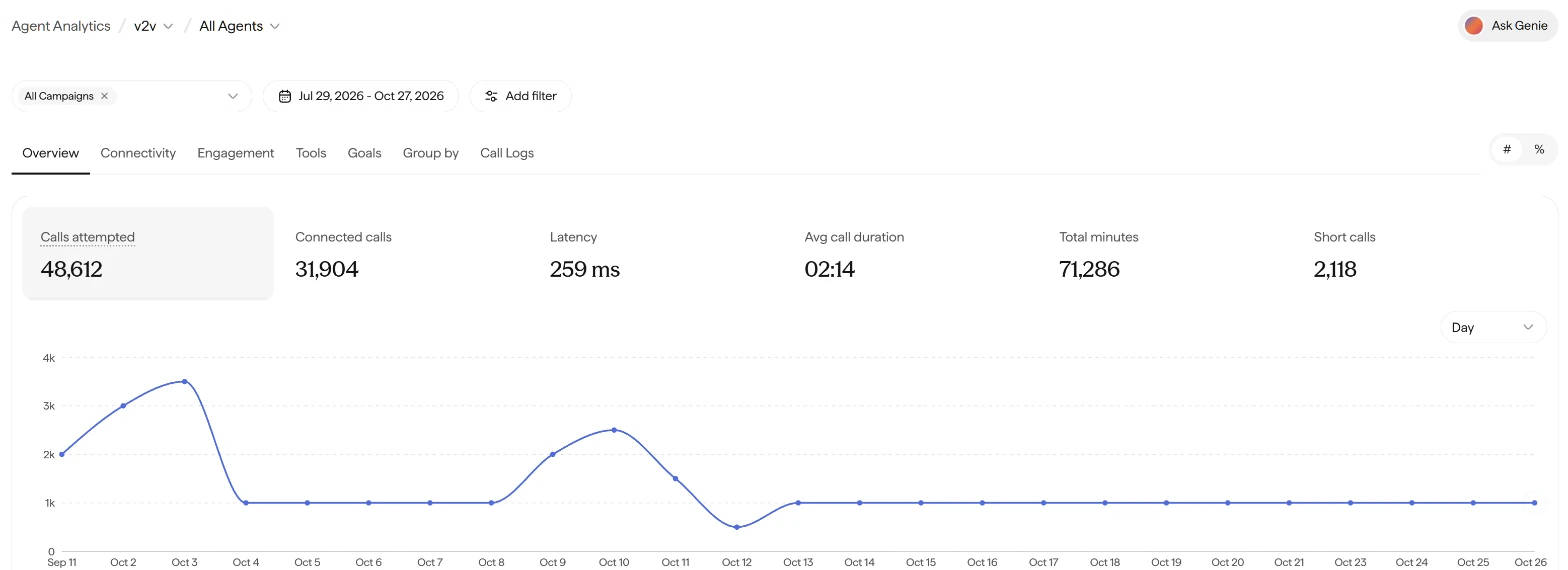
Voice Agents analytics, Overview tab: calls attempted, connected calls, latency, average call duration, total minutes and short calls, with calls per day as a line chart
See all insurance templates

Customer data stays in India

Every model on the call runs on Sarvam's own infrastructure, with no outside AI provider involved.

Visit the Trust Center
  • ISO 27001 certified
    Information security ISO 27001:2022 Certified
  • AICPA SOC 2
    Controls attestation SOC 2 Type II Audited
  • Where call data stays India Including customers' personal details
  • Models on the call Sarvam infrastructure No outside AI provider

Questions about claim intimation (FNOL) agents

Updated

What is FNOL in insurance, and can a voice agent take it?

FNOL, or first notice of loss, is the first report a policyholder makes after an incident. In India it is usually called claim intimation. A voice agent can take that call, collect the details your claim form needs, register the claim through a webhook and send the reference by SMS.

How does claim intimation by voice work?

The agent verifies the policy, takes the incident details and reads a summary back to the caller. Once the caller confirms, a webhook creates the claim in your claims system and returns the reference, which the agent reads out and sends by SMS.

Which details does the agent collect at first notice of loss?

You set the questions for each line. For motor, that is usually the date, time, place, cause, damage, injuries and the other party. For health, the hospital, the admission date and the condition. For home, the cause and the rooms and items affected.

What happens with injuries, theft or large losses?

You decide which cases go to a person. The agent transfers the live call to your claims desk at a phone number or SIP address, and the details already captured go with the claim.

Does the agent decide whether the claim is covered?

No. The agent registers the claim and routes it. Decisions on cover, surveys and settlement stay with your claims team.

Where is policyholder data processed?

All call data, including policyholders’ personal details, stays in India. Every model on the call runs on Sarvam’s own infrastructure, with no outside AI provider involved. That infrastructure is ISO 27001:2022 certified and SOC 2 Type II attested.

Build the Future of India's AI with Sarvam