Sarvam AI

Revive lapsed policies with Sarvam Voice Agents

Sarvam Voice Agents call policyholders whose life policy has lapsed, explain what it takes to revive it, and send the revival link on the same call.

Lapsed policies called within a week of the grace period ending
90%
Policyholders reached within three call attempts
70%
Calls that end with the revival link sent
60%

How the agent handles a policy revival

Five steps the agent follows for every policy on your lapsed list.

Step 1 of 5

Confirm the policyholder

The agent calls from your lapsed list and checks it is speaking to the policyholder before it says anything about the policy or the dues.

Policyholder Confirmed
Policy LP-7731-2084
Date of birth Matched

Revival calls that end with a link to pay

The agent reads the lapsed policy before it dials, explains the dues in rupees, and sends the revival link while the policyholder is on the line.

Calls only the policies you can revive

Upload your lapsed list as a campaign, or trigger a call from your policy system when the grace period ends. The agent skips policies outside your revival window and any already revived.

Revival campaign Running

Lapsed this month 2,460
Inside revival window 2,105
Already revived Skipped
Voice Agent

"Am I speaking with Rajesh Verma?"
Explains the dues in rupees

Reads the missed premiums, the interest and whether a health declaration is needed from your revival rules, then says the total in one figure.

To revive Your rules

Premiums due 2 x ₹18,500
Interest ₹1,850
Total ₹38,850
Voice Agent

"The total to revive your policy is ₹38,850."

Sends the revival link on the call

Sends your revival link by SMS or WhatsApp through your own providers and stays on the line until it arrives. The policyholder pays and fills in the health declaration on your page.

SMS Delivered

Hi Rajesh, revive policy LP-7731-2084: pay ₹38,850 and fill in a short health declaration. revive.example.com/LP7731

Voice Agent

"The link is on your phone now."

Hands the hard cases to your team

If the policyholder declares a new health condition, the agent transfers the call to your underwriting team. Plan changes and surrender requests go to your policy servicing team. The transcript goes with every transfer.

Transfer Underwriting team

Reason New health condition declared
Policy LP-7731-2084
Transcript Attached
Voice Agent

"I am connecting you to our underwriting team now."

Built for how policyholders respond

Some think the money they paid is gone. Some cannot pay it all at once. Some have a new health condition to declare. The agent reads the policy and your revival rules before it dials, so it is ready for all three.

  • Is my money gone?

    The agent explains from your revival rules that the policy comes back on its original terms once the dues are paid, instead of guessing.

  • I cannot pay it all today

    If your rules allow revival in instalments, the agent explains them. If not, it books a callback on the date the policyholder names and checks for payment before it dials.

  • My health has changed

    The agent does not judge a health condition. It notes what the policyholder said and transfers the call to your underwriting team, who make the decision.

Set up your policy revival agent

Describe your policy revival call to Genie and it builds the agent for you.

Build your agent

Shape the conversation

  • Build with Genie

    Tell Genie you want an agent that calls lapsed policyholders. It writes the agent, sets its goals, and lists the outcomes it must record. Keep talking to Genie to change the wording.

  • Connect your knowledge and systems

    Add your revival rules and FAQs as a knowledge base. Connect your policy and payment APIs as tools so the agent can read the dues and send the link.

Connect and launch

Give every call a next step

  • Test every scenario

    Test the hard cases before launch, like a policyholder who can only pay part, a new health condition or a policy outside the revival window.

  • Connects to a phone number

    Rent a phone number from Sarvam or connect your existing telephony provider. KYC is required for rentals.

  • Take it live

    Upload your lapsed list as a campaign and the agent calls each policyholder. Track revivals, payments and callbacks on your dashboard.

Measure results

See where conversations lead

  • Track every outcome

    Track policyholders reached, revival links sent, policies revived after the call and calls transferred.

  • Where revivals stall

    See which policyholders took the link but did not pay, and the reasons others gave for declining.

  • By plan and language

    Break down outcomes by plan type, months since lapse and call language.

What to measure

Each one is on the template's results view from the first call. Read them in the order a call runs.

  1. Connected calls

    Every call that reached the customer.

  2. Policyholders reached

    Share of revivable policies where the agent spoke to the policyholder, by call attempt and months since lapse.

  3. Revival links sent

    Share of connected calls where the policyholder heard the revival terms and took the link, by plan type and call language.

  4. Policies revived after the call

    Revival payments made through the link the agent sent, matched against your payment system before the next call round.

Reasons revivals stall, taken from each transcript

  • Cannot pay the full amount now
  • New health condition to declare
  • Wants to surrender
  • Bought another policy
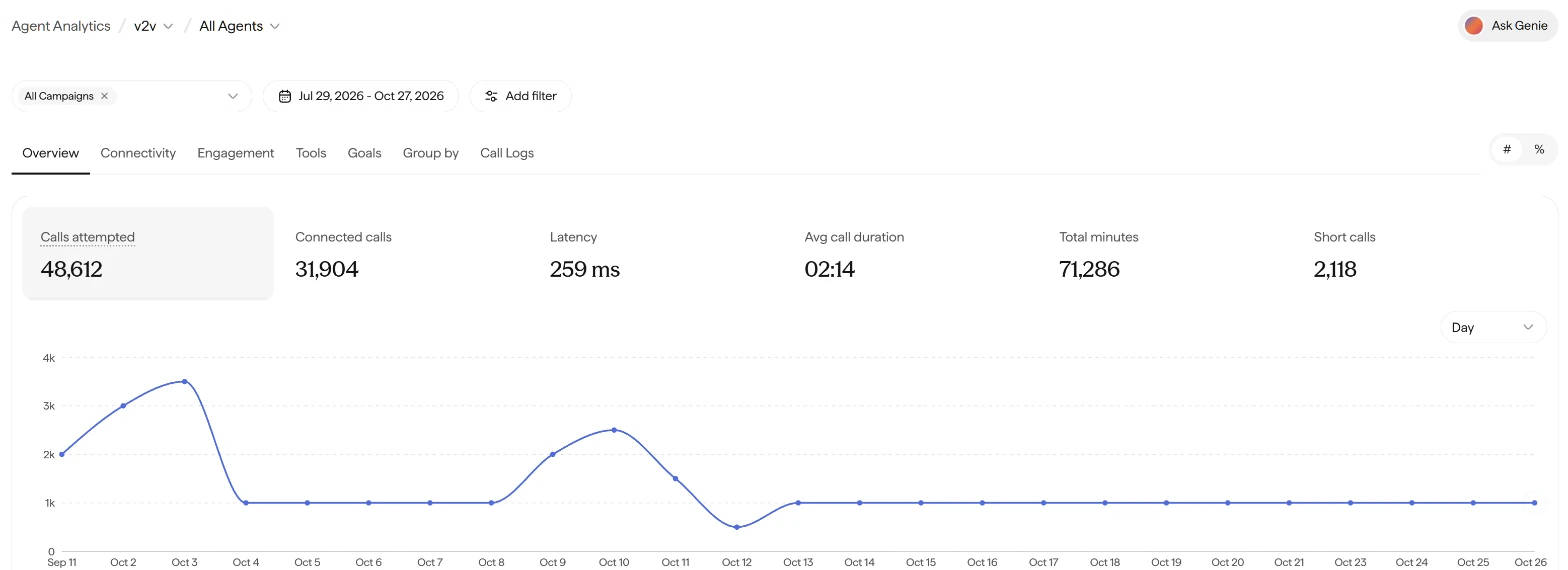
Voice Agents analytics, Overview tab: calls attempted, connected calls, latency, average call duration, total minutes and short calls, with calls per day as a line chart
See all insurance templates

Customer data stays in India

Every model on the call runs on Sarvam's own infrastructure, with no outside AI provider involved.

Visit the Trust Center
  • ISO 27001 certified
    Information security ISO 27001:2022 Certified
  • AICPA SOC 2
    Controls attestation SOC 2 Type II Audited
  • Where call data stays India Including customers' personal details
  • Models on the call Sarvam infrastructure No outside AI provider

Questions about lapsed policy revival agents

Updated

What is policy revival?

Policy revival brings a lapsed policy back into force. The policyholder pays the missed premiums, usually with interest, and meets any health requirements the insurer sets. The agent calls lapsed policyholders, explains your revival terms and sends the revival link.

How does the agent explain the dues for a policy revival?

It reads the premiums due, the interest and any health declaration requirement from your systems and knowledge base, and says the total in rupees in the policyholder's language. The figures match your records at the time of the call.

Can the policyholder pay during the call?

The agent sends your revival link by SMS or WhatsApp through your providers, so the policyholder can pay on their phone during or after the call. Payment and the health declaration happen on your own page.

What if the policyholder declares a new health condition?

The agent notes what the policyholder said and transfers the live call to your underwriting team, or books a callback. The decision stays with your underwriters.

Which languages can policyholders use?

The agent works across Indian languages and English. When language switching is on, it follows the policyholder if they change language mid-call.

Where is policyholder data processed?

All call data, including policyholders’ personal details, stays in India. Every model on the call runs on Sarvam’s own infrastructure, with no outside AI provider involved. That infrastructure is ISO 27001:2022 certified and SOC 2 Type II attested.

Build the Future of India's AI with Sarvam