Sarvam AI

Handle policy servicing calls with Sarvam Voice Agents

Sarvam Voice Agents answer your servicing line, verify the policyholder, record nominee, address and contact changes in your policy admin system, and send the documents they ask for on the same call.

From the first ring to a raised service request

Five steps the agent follows on every policy servicing call.

Step 1 of 5

Answer and find the request

The agent answers your servicing number and asks what the caller needs, in their language, with no menu of options to press through.

Incoming call Answered
Caller said "I have moved house"
Request Address change

Routine policy changes, completed on the call

The agent verifies the caller, raises the request in your policy admin system, and tells them what happens next.

Verifies before it changes anything

Checks the policy number, date of birth or registered mobile number against your records before it reads out or edits a single detail.

Verification 2 of 2

Policy number
Date of birth
Voice Agent

"Thank you. Your details match our records."
Records the change and reads it back

Captures the new nominee, address, mobile number or email, reads it back for the caller to confirm, and only then writes it to your policy admin system.

Nominee change Confirmed

New nominee Sunita Verma
Relation Wife
Next Signature form sent
Voice Agent

"Sunita Verma, your wife. Is that right?"

Sends the documents asked for

Sends a policy copy, a policy schedule or a premium paid certificate to the email or mobile number on record, through your providers.

Email Sent

Policy 5521883014: premium paid certificate for FY 2025-26 attached.

Voice Agent

"The certificate is in your inbox now."

Hands bigger requests to your team

A surrender, an assignment or a complaint goes to your policy servicing team as a live transfer. The verified details and the reason go with the call.

Transfer Policy servicing team

Reason Surrender request
Caller Verified
Transcript Attached
Voice Agent

"I am connecting you to our policy servicing team now."

Built for how policyholders
ask for a change

Callers say what changed, not the name of the request. The agent works out what they need and checks who is allowed to ask for it.

  • Requests in everyday words

    "I have moved house" is an address change. "The premium receipt for my taxes" is a premium paid certificate. The agent maps each one to the request your system expects.

  • Emails and addresses, spelt out

    Callers spell email IDs letter by letter and give addresses with landmarks. The agent captures each detail and reads it back before it is saved.

  • A son calling for his mother

    Family members often call for older policyholders. The agent can send a document to the registered email, and explains that a nominee change needs the policyholder's own signature.

Set up your policy servicing agent

Describe your policy servicing call to Genie and it builds the agent for you.

Build your agent

Shape the conversation

  • Built with Genie

    Tell Genie which servicing requests you want the agent to complete. It writes the agent, sets its goals and lists the scenarios to cover. Keep talking to Genie to add more requests.

  • Connect your knowledge and systems

    Add your servicing rules and FAQs as a knowledge base. Connect your policy admin webhook, customer records and document store as tools so the agent can verify, record and send.

Connect and launch

Give every call a next step

  • Test every scenario

    Test the hard cases before launch, like a caller who fails verification, a son calling for his mother or a surrender request.

  • Connects to a phone number

    Rent a phone number from Sarvam or connect your existing telephony provider. KYC is required for rentals.

  • Take it live

    Once your servicing number is connected, the agent answers every call. Track requests raised and transfers on your dashboard.

Measure results

See where conversations lead

  • Track every outcome

    Track calls answered, callers verified, requests raised, documents sent and calls transferred.

  • Where requests stall

    See which requests are waiting on a signed form or address proof, and which calls failed verification.

  • By request and language

    Break down calls by request type, policy line and call language, and compare call duration.

What to measure

Each one is on the template's results view from the first call. Read them in the order a call runs.

  1. Connected calls

    Every call that reached the customer.

  2. Callers verified

    Share of answered calls where the caller passed the checks your rules set, by request type and call language.

  3. Requests completed on the call

    Service requests raised in your policy admin system during the call, each with a reference read out and sent by SMS.

  4. Documents sent

    Policy copies, schedules and premium paid certificates sent to the registered email or mobile, by document type.

Reasons for transfer, taken from each transcript

  • Surrender request
  • Assignment
  • Complaint
  • Failed verification
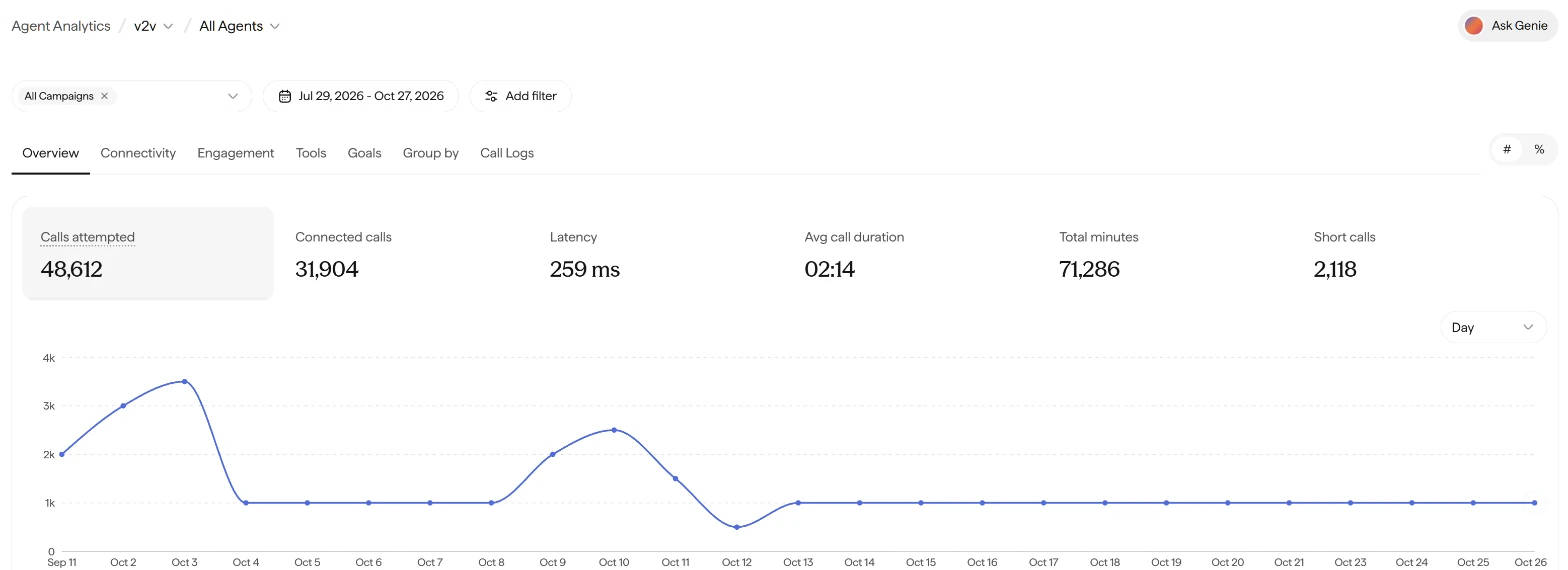
Voice Agents analytics, Overview tab: calls attempted, connected calls, latency, average call duration, total minutes and short calls, with calls per day as a line chart
See all insurance templates

Customer data stays in India

Every model on the call runs on Sarvam's own infrastructure, with no outside AI provider involved.

Visit the Trust Center
  • ISO 27001 certified
    Information security ISO 27001:2022 Certified
  • AICPA SOC 2
    Controls attestation SOC 2 Type II Audited
  • Where call data stays India Including customers' personal details
  • Models on the call Sarvam infrastructure No outside AI provider

Questions about policy servicing agents

Updated

What is policy servicing in insurance?

Policy servicing covers the changes and requests a policyholder makes after buying a policy, such as updating a nominee, address or mobile number, or asking for a policy copy. A Sarvam Voice Agent completes these routine requests on the phone and writes them to your policy admin system.

Which policy servicing requests can the agent complete?

Nominee, address, mobile and email changes, and requests for documents such as a policy copy, a schedule or a premium paid certificate. You decide which requests it completes on the call and which go to your policy servicing team.

How does the agent update the policy admin system?

You connect a webhook or API as a tool. The agent sends the confirmed change, receives the service request reference, and reads it back to the caller. Nothing is written until the caller has confirmed the details.

What if a family member calls instead of the policyholder?

The agent follows your rules on who can make which change. It can send documents to the registered email or mobile, and for changes such as a new nominee it sends the form to the policyholder to sign.

Which requests go to a person?

Any request you choose to keep with your team, such as a surrender, an assignment or a complaint. The agent transfers the live call to a phone number or SIP address you set, with the transcript attached.

Where is policyholder data processed?

All call data, including policyholders’ personal details, stays in India. Every model on the call runs on Sarvam’s own infrastructure, with no outside AI provider involved. That infrastructure is ISO 27001:2022 certified and SOC 2 Type II attested.

Build the Future of India's AI with Sarvam