
Digital channels and short videos
Punjabi creator videos
Give a Hindi comedy clip or interview a Punjabi edition. Review the meaning of idioms and the timing of the response that carries the joke.


AI dubbing
Translate your video into Punjabi while keeping the original speaker's voice.
Upload videoSupports MP4, MP3, WAV and SRT files up to 2 GB or 1 hour.
Hear the difference
IIT Madras lecture · Punjabi edition · Switch versions, then press play to compare.
Bring a Hindi explainer or English interview to Punjabi-speaking viewers in the original voice. Review the translated dialogue and delivery before publishing your Punjabi edition.
Give a Hindi comedy clip or interview a Punjabi edition. Review the meaning of idioms and the timing of the response that carries the joke.
Dub an irrigation demonstration into Punjabi. Check spoken quantities and local equipment terms against the original procedure with a subject reviewer.
Create Punjabi versions of vocational lessons. Match tool names to the objects shown and verify safety instructions before sharing the recording.
Explain an app task in Punjabi. Keep English controls such as “Submit” recognisable when the interface itself has not been translated.
Adapt a documentary interview into Punjabi. Review the distinction between the narrator’s voice, a quoted passage and the interviewee’s speech.
Create Punjabi editions of recorded community announcements. Confirm dates and venue names, and review written subtitle requirements separately from the audio.
Organisations using Sarvam content workflows






Keep the speaker recognisable and shape the Punjabi version before you publish.
Choose voice cloning to carry the original speaker's vocal identity into the Punjabi version.
Workflow illustration · Review the result in your workspace
For developers
Create Punjabi versions from your application. Upload the source, track the dubbing job and retrieve the finished video and subtitles.
Python SDK · Set SARVAM_API_KEY in your server environment
import os
from pathlib import Path
from sarvamai import SarvamAI

client = SarvamAI(
    api_subscription_key=os.environ["SARVAM_API_KEY"]
)
media = Path("source-video.mp4")

job = client.dubbing.create(
    source_language_code="en-IN",
    target_language_codes=["pa-IN"],
    export_options=["video", "srt"],
    voice_cloning=True,
    num_speakers=1,
    job_name=media.name,
)
client.dubbing.upload(job.data.upload_url, media)
client.dubbing.start(job_id=job.data.job_id)
Translate your video into Punjabi, review the dialogue and download your dub in Sarvam.
Add an MP4 or MOV video, or an MP3 or WAV recording, in the dubbing workspace.
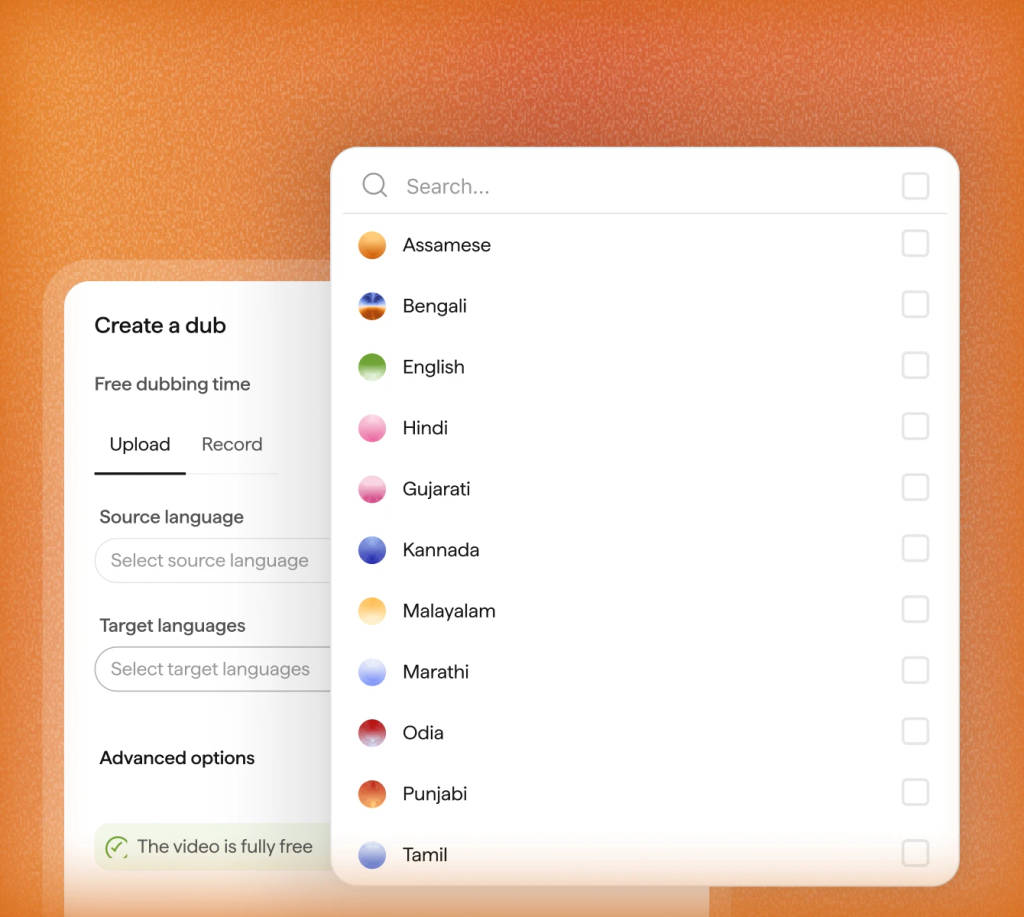
Select the source language, Punjabi as the target, speaker count and voice. Then create the dub.
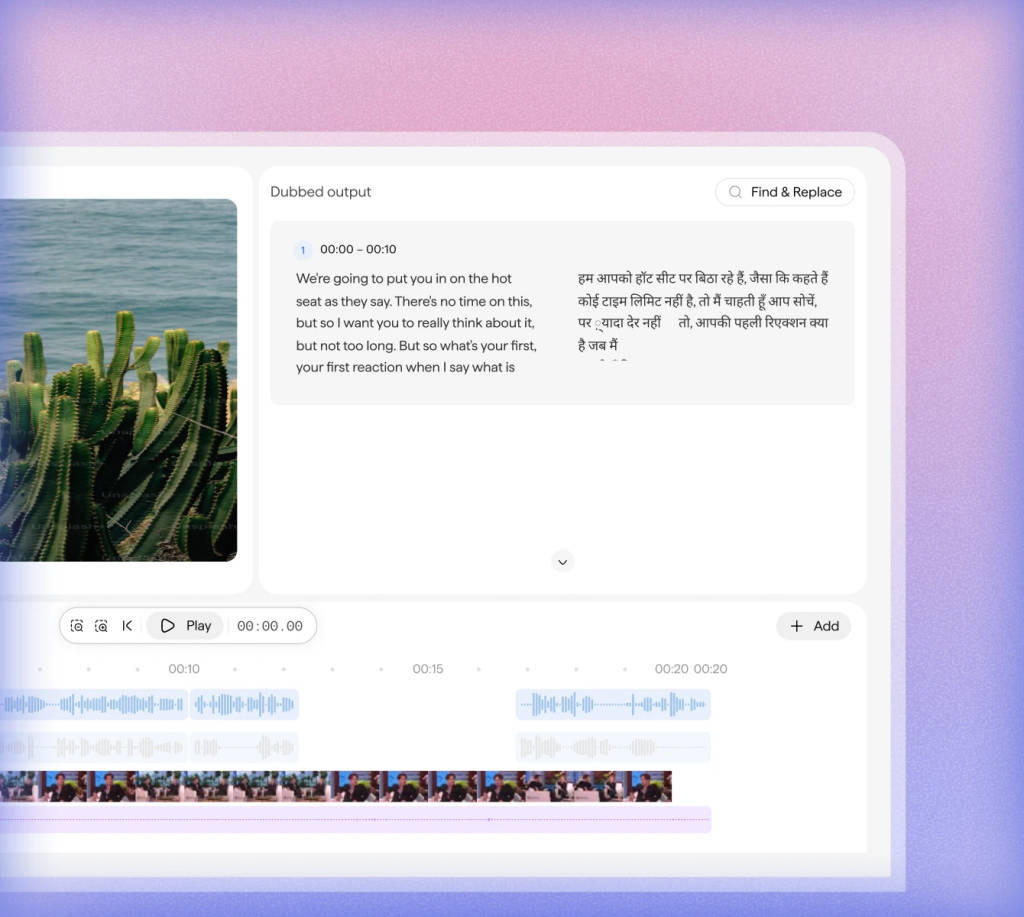
Listen to the Punjabi version beside the original. Edit translated lines and regenerate any blocks that need a correction.
Set the audio mix and export the reviewed video. The API also provides separate audio and SRT subtitles.
Upload your video, choose Punjabi and select the speaker's voice. Review the translated version in Sarvam's dubbing workspace.
Correct a name or adjust a phrase in the Punjabi script. Regenerate that block, listen again and set the audio mix before export.
Yes. Upload the Hindi video and select Punjabi as the target language. Review the translated script and generated audio before publishing.
Spoken audio and written subtitles are separate deliverables. Review your caption requirements with the intended publisher, and check the exported subtitle file before release.
AI dubbing translates speech from a video or audio recording into Punjabi and generates a new voice track. Sarvam lets you review the translated script, edit individual lines and export the dubbed version.
The workspace accepts MP4 and MOV video, or MP3 and WAV audio, with uploads up to 2 GB. The dubbing API also accepts MKV, WebM, AVI, FLV, WMV and M4A. API size and duration limits depend on your plan.
Yes. Set the number of speakers during setup and choose voice cloning to retain their vocal identities. You can also leave the speaker count and source language on auto-detect. Review each speaker’s lines in the Punjabi output, especially where voices overlap.
Yes. Edit the translated text in its timestamped block, regenerate that block’s audio and listen again. You can compare it with the original and adjust the dubbed, original and background audio levels before export.
The workspace exports the reviewed dubbed video. For separate deliverables, the dubbing API can generate video, audio and an SRT subtitle file for Punjabi. Request the formats you need in export_options when creating the job.
The default Starter API rate is ₹40 per minute of source media for each target language, billed per whole second. A 5-minute video dubbed into one language costs ₹200 at that rate. Editor-enabled API jobs use a different rate. On the Sarvam platform, dubbing with the editor costs ₹80 per minute, and your first 30 minutes are free when you sign up. In the workspace, check the credit estimate before creating your dub. See the linked documentation for current pricing.
Use pa-IN as the target language code in Sarvam’s dubbing API. Create a job, upload your media, start processing and poll until completion. Then retrieve the requested exports. You can include multiple target languages in one job.
Product details checked on 21 September 2026. Workspace guide · API limits and pricing
Explore dubbing guides and examples for more Indian languages.
Pick the kind of video or recording you work with.
Create your next video in Punjabi Upload your source video, choose a language and review the new version in Sarvam.
Create your next video in Punjabi
Upload your source video, choose a language and review the new version in Sarvam.